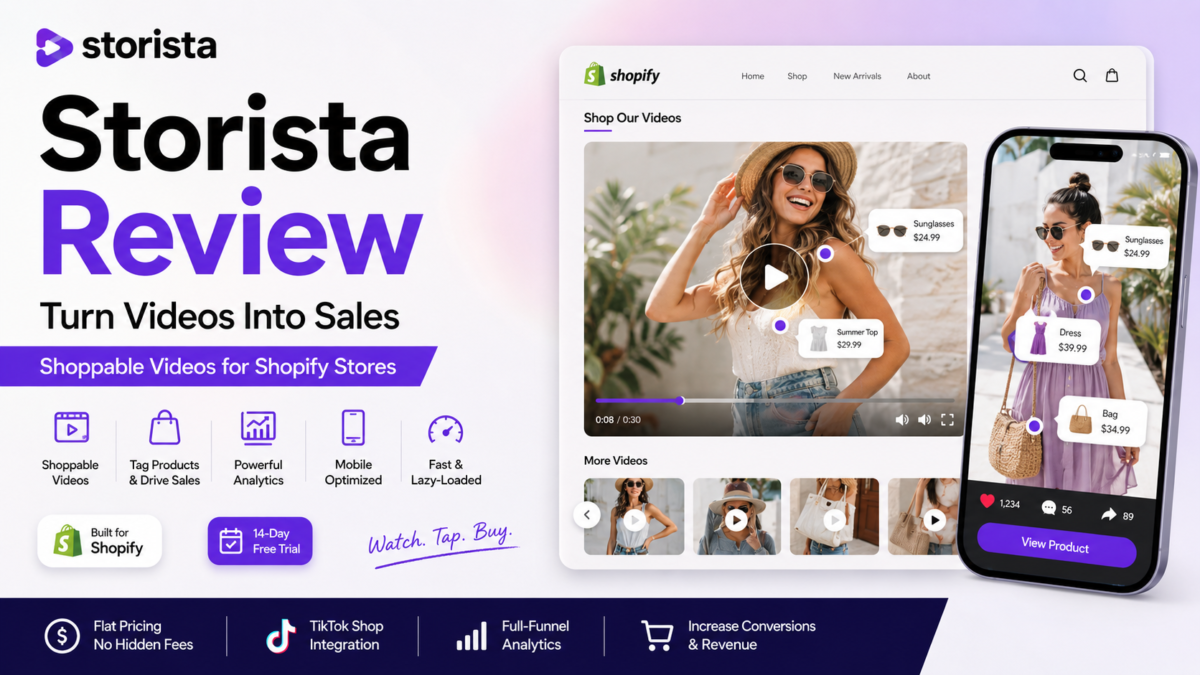
If you’re running a Shopify store — especially a dropshipping store where your product photos look a lot like everyone else’s — video is what actually stops the scroll. That’s the whole pitch behind Storista, a shoppable video app that turns your TikToks, Reels, and customer clips into clickable, buyable widgets right on your store. I dug through the app, the pricing, and what real merchants are saying, so here’s the honest rundown of storista review.
Quick note: This post contains an affiliate link. If you sign up through it, we may earn a small commission at no extra cost to you.
Want the short answer? Jump straight to the verdict.
What Is Storista, Exactly?
In plain terms: Storista is a Shopify app that lets you pull in video clips — from Instagram, TikTok, or your own uploads — tag your products inside them, and drop them onto your store as shoppable sections. A shopper watches a video, taps the product they like, and adds it to cart without ever leaving the clip. Think of it less like a “video player” and more like turning your best UGC and creator content into a mini storefront.
It’s built specifically for Shopify (it carries the “Built for Shopify” badge, which is Shopify’s own quality certification), and it also connects to TikTok Shop, so you can publish shoppable videos out to TikTok directly from the same dashboard.
The Features That Actually Matter
Five widget styles, drop-in anywhere: Carousel, Spotlight, Stories, Pop-up, and Grid. These are theme-friendly blocks, meaning you place them through Shopify’s regular theme editor — no developer needed, no custom code to touch.
On-brand out of the box: Storista auto-matches your store’s fonts and colors when you install it, then lets you fine-tune colors, type, and layout yourself, save your own style templates, and drop in custom CSS if you want full control.
Analytics that go past “views”: This is the part I actually care about. Storista tracks the full path — views, clicks, add-to-carts, and completed sales — broken down by video, widget, page, and product. That means you can see which specific clip is actually driving revenue instead of just guessing.
Built for speed: Videos are lazy-loaded, so they only load once a shopper actually scrolls to them, which keeps your page speed scores intact — something Google (and your conversion rate) cares about.
Storista Review Pricing Breakdown
Every plan comes with a 14-day free trial, and pricing is flat — no per-view or per-impression fees, which matters a lot once a video starts going viral and you don’t want a surprise bill.
Basic — $15/month: 50 videos, unlimited views, basic analytics, HD video, no watermark. Solid starting point for a smaller store testing the waters.
Business — $49/month: Everything in Basic, plus unlimited videos, advanced analytics, and AI-powered smart tagging (which auto-tags products in your clips instead of you doing it manually). This is the plan most growing dropshipping stores will actually land on.
Scale — $199/month: Everything in Business, plus Full HD video, deeper customization, video inside your product gallery, and support for multiple stores sharing the same asset library. This one’s really built for bigger multi-store operations.
Prices reflect what’s listed publicly at the time of writing — always double-check current pricing on Storista’s site before you commit.
Real Results (And a Bit of Healthy Skepticism)
Storista highlights a case study from a kids’ toy store that switched over from a competing app, got installed in about half an hour, and saw a big jump in video-driven revenue within the first week. Numbers like that are always the best-case example a company chooses to show off, so treat it as “this is possible,” not “this is guaranteed.” Your results will depend heavily on how much decent video content you actually have to work with.
Storista vs. Other Shoppable Video Apps
If you’re weighing Storista against alternatives like Videowise, Tolstoy, or ReelUp, the honest advice is: don’t just compare feature lists, compare pricing models. Some competing apps charge based on impressions or traffic, which can get expensive fast once a video takes off — that’s exactly the surprise-fee problem Storista’s flat pricing is built to avoid. Beyond that, the real differences tend to come down to how deep the analytics go and how much manual tagging work is left to you, so it’s worth running the free trial on your own store before locking into an annual plan.
The Honest Pros and Cons
Where it’s strong: No-code setup, flat pricing with no impression fees, genuinely useful full-funnel analytics, TikTok Shop integration, and a 14-day trial that costs you nothing to test.
Where it falls short: The free trial only really proves itself if you already have decent video content to import — if you’re starting from zero clips, you’ll need to shoot some first. The jump from Basic to Business ($15 to $49) is steep if you outgrow 50 videos quickly. And if you’re running Shopify POS in a physical location, Storista’s public site doesn’t advertise any in-person POS integration — it’s built for your online storefront, not your checkout counter.
Is Storista Worth It?
If you’re running a Shopify dropshipping or DTC store and you’ve already got TikToks, Reels, or customer videos sitting around doing nothing, Storista is a low-risk way to put them to work. The flat pricing protects you from the “went viral, got a huge bill” problem other apps have, and the analytics actually tell you whether video is worth your time — not just whether people are watching it.
If you don’t have any video content yet, hold off and shoot a handful of clips first. An empty shoppable video widget won’t do anything for your conversion rate no matter how good the app is.
Start Your Free 14-Day Storista Trial
Frequently Asked Questions
Is Storista optimized for mobile shoppers?
Yes. Since most shoppable video traffic comes from mobile, the widgets are built mobile-first, with the same lazy-loading approach that keeps load times fast on phones.
Can Storista work with custom Shopify themes?
Yes, widgets are added as standard theme-editor app blocks, so they work with most themes without needing custom code — though heavily customized themes should always be tested during the free trial first.
What does the embed process actually look like?
You install the app from the Shopify App Store, import your clips, tag your products on the video, pick a widget style, and place it on a page through the theme editor. No developer required.
Does Storista offer onboarding support for new users?
Higher-tier plans include more hands-on support, and there’s a help center plus live support for setup questions on any plan.
Is there a free trial before I pay anything?
Yes — every plan includes a 14-day free trial, and you can cancel during that window without being charged.
Affiliate & Referral Disclosure: This post includes an affiliate link for Storista. If you sign up through it, we may earn a commission at no extra cost to you — it’s one of the ways we keep this blog running. We only recommend tools we’ve genuinely researched and believe are worth your time. No hype. Just truth. Sip. Click. Earn.