Let’s clear up the biggest myth first, because it will save you a lot of money: an AI tool does not make money. You do — the tool just makes you faster.
Nobody pays you for “using ChatGPT.” They pay you for the finished thing — the article, the design, the video, the automation. The AI is just the helper that lets you make that thing in an afternoon instead of a week. Once that clicks, you stop hunting for a magic app and start picking the right helper for the job you want to do.
So this is a simple, honest list of the AI tools that genuinely help beginners earn in 2026 — grouped by what you want to do, with what each one costs (most have a free version), and a quick tip for each. No hype, no “get rich” nonsense, and a short warning at the end about the “AI tools” you should actually avoid. Let’s go. 🤖
This post contains affiliate links — see disclosure at the bottom .
📎 New here? This is the tools companion to our main guide, Make Money With AI in 2026: 7 Real Side Hustles. That guide shows you what to do to earn with AI; this one shows you which tools to use for it. Read them together — pick a hustle there, grab your tools here.
📋 In This Guide
- One rule before you start
- ✍️ Tools for writing & content
- 🎨 Tools for design & images
- 🎬 Tools for video & voice
- ⚙️ Tools for automation & services
- 🛒 Tools to sell what you make
- Which tool should I start with?
- ❌ AI “tools” to avoid
- FAQ
One rule before you start
💡 You do not need ten tools. You need one or two. The most common beginner mistake is subscribing to five apps in week one, paying for all of them, and earning from none. Pick the job you want to do first, grab the one or two tools that power it, start on the free version, and only pay once a tool is clearly earning more than it costs.
Almost every tool below has a free tier that’s good enough to start. Start there. Now pick your lane.
✍️ Tools for writing & content
Best if you want to: write articles, emails, product descriptions, or social posts — for clients or your own blog.
ChatGPT — the all-rounder. It drafts articles, emails, scripts, and outlines, and helps you brainstorm. The free version is genuinely useful; the paid plan is around $20/month. Tip: don’t ask it to write the whole thing and paste it raw — use it to draft and think faster, then add your own voice and facts. That human layer is what clients actually pay for. (See our freelance writing side hustle guide.)
Claude — best for longer, more careful writing and research. It holds quality across long documents better than most, which makes it great for e-books, guides, and editing. Free tier plus paid plans. Tip: use it to polish and tighten work you’ve drafted, not just to generate from scratch.
Jasper / Copy.ai — built specifically for selling copy: sales pages, ads, email sequences. They’re mostly paid (with free trials), so they earn their place once you’re actually offering copywriting. Tip: start free with ChatGPT, and only move to these once a client is paying you for conversion copy. (Compare them in our Copy.ai vs Jasper vs Writesonic breakdown.)
🎨 Tools for design & images
Best if you want to: design graphics, sell templates, or create art for products.
Canva — the most beginner-friendly design tool there is, now with AI built in (Magic Studio). Make social graphics, presentations, printables, and brand kits by dragging and dropping. Generous free tier; Pro is around $13/month. Tip: a popular beginner path is designing simple templates (planners, social kits) and selling them on Etsy — no design degree needed.
Midjourney — produces the highest-quality AI art, which is why it’s the go-to for print-on-demand, posters, and book covers. It’s paid (roughly $10–$30/month, no real free tier). Tip: pair it with print-on-demand so your art becomes products people buy. Here’s how to design products with AI.
🎬 Tools for video & voice
Best if you want to: make short videos, run a faceless channel, or sell editing/voice services.
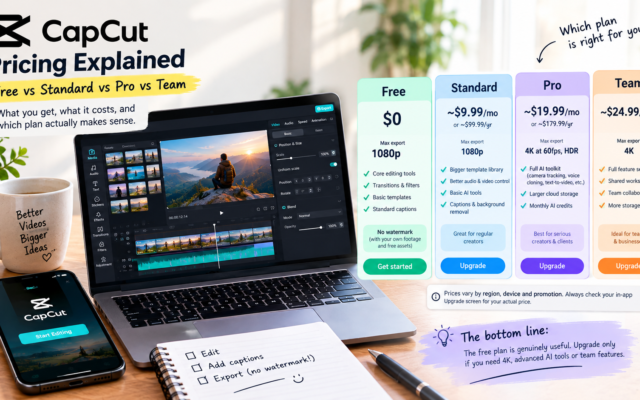
CapCut — free, simple video editing that’s perfect for Shorts, Reels, and TikToks. Tip: short-video editing is one of the easiest services to sell to small businesses and creators who don’t have time to do it themselves.
ElevenLabs — the most realistic AI voices available, used for faceless YouTube, audiobooks, and voiceover gigs. Free tier plus affordable paid plans. Tip: the free tier is enough to test a channel before you pay. (We picked the best ones in best AI voiceover tools in 2026.)
Pictory — turns long content (a blog post, a webinar, a long video) into short clips fast. Tip: “content repurposing” — chopping one long video into a week of clips for a business — is a real, low-cost service with monthly retainers. Pictory is built for exactly that. (More in our faceless YouTube guide.)
⚙️ Tools for automation & services
Best if you want to: offer the breakout 2026 service — setting up AI automations for small businesses.
n8n, Make & Zapier — these connect a business’s apps so things happen automatically (a new lead gets emailed, saved, and logged with no human touch). This is the highest-paying beginner-reachable service right now. n8n can even be used free if you self-host; Make and Zapier have free tiers. Tip: learn one, not all three. (Start with our AI automation side hustle guide and our n8n vs Make vs Zapier comparison.)
Chatbot builders (Botpress, Voiceflow) — let you build simple AI chatbots for businesses (answering customer questions, booking appointments) with no coding. Free tiers to learn on. Tip: local businesses pay well for a chatbot that answers their after-hours inquiries.
🛒 Tools to sell what you make
Best if you want to: actually get paid — because making the thing is only half of it.
Gumroad — the simplest way to sell digital products (templates, e-books, prompt packs, Notion setups). Free to start; it takes a small cut per sale. Tip: make one product with the tools above and list it here — your first sale is the best motivation there is. (See passive income ideas that actually work.)
Printify / Printful — print-on-demand: you upload a design, they print and ship the product only after someone buys. No inventory, no upfront cost. Tip: this is how your AI art turns into real income. (Compare them in Printful vs Printify.)
Fiverr / Upwork — where you find the clients for every service above (writing, editing, automation, design). Free to join. Tip: a narrow offer sells fastest — “I’ll edit five short videos in 24 hours” beats “I do video stuff.” (New to it? Here’s how to get started on Fiverr.)
Which tool should I start with?
If you’re staring at this list feeling unsure, just match what you want to do to one starting tool:
| I want to… | Start with | It powers… |
|---|---|---|
| Write for clients or a blog | ChatGPT (free) | Freelance writing |
| Design & sell templates | Canva (free) | Digital products |
| Make art for products | Midjourney + Printify | Print-on-demand |
| Edit short videos | CapCut (free) | Video / repurposing service |
| Run a faceless channel | ElevenLabs (free tier) | Faceless YouTube |
| Automate for businesses | Make or n8n (free tier) | AI automation service |
❌ AI “tools” to avoid
The honest part most tool lists skip — because warning you doesn’t earn them a commission:
❌ “AI trading bots” and “passive income AI apps.” You’ll see endless ads for AI apps that “trade crypto or stocks for you” and promise hands-off income, often dangling a “free $99 credit” or “instant cash bonus.” Be very careful. These carry real risk of losing your money, and many follow classic scam patterns. Real AI income comes from a skill plus work — not a bot that prints cash while you sleep. If it promises easy passive money, walk away.
❌ A “$297 AI tool stack / system.” If someone’s main product is an expensive bundle or course that teaches you to make money with AI, you’re usually the one being sold to. Everything you need to start is on the free tiers above.
❌ Ten subscriptions at once. Not a scam, just a money pit. Resist the urge to collect tools. One or two, used well, beats ten paid and forgotten.
Frequently asked questions
Can I really make money with AI for free?
Yes, to start. Almost every tool here has a free version that’s good enough for your first projects. Print-on-demand and selling digital products have no upfront cost either. Begin free, and only pay for a tool once it’s clearly saving you time or earning more than it costs.
What is the best free AI tool to make money?
It depends on your hustle, but for most beginners ChatGPT (for writing) and Canva (for design) are the two most useful free starting points. They cover the widest range of money-making tasks with zero spend.
Which AI tool is best for a complete beginner?
Canva and ChatGPT — both are free, easy to learn in an afternoon, and used by millions, so help is everywhere. Pick the one that matches whether you’d rather write or design.
Do I need to pay for AI tools to earn money?
No, not to start. Pay only when a tool clearly earns more than it costs — for example, upgrading ChatGPT once you have paying writing clients, or Midjourney once your prints are selling. Never pay before your first dollar.
Is AI crypto or stock trading a good way to make money?
For beginners, be very cautious. “Hands-off AI trading” apps that promise easy passive income are high-risk and a common scam pattern. This isn’t financial advice, but if you want to build income with AI, the skill-based paths above are far safer and more reliable.
The bottom line
You don’t need to master AI or buy a single course to start earning with it. You need to pick one job you want to do, grab the one or two free tools that power it, add your own human judgment, and stay consistent. The tool is the helper. You’re still the business.
Not sure which money-making path to pair these tools with? Start with our full guide to the 7 real AI side hustles that actually pay — pick one, come back, and grab the tools for it.
One more free move that pays off later: whatever you build, start collecting emails from day one — it’s the one audience no platform can take away from you.
Tool features, free tiers, and prices change often — always check the tool’s current pricing before you commit. This article is general guidance, not financial advice, and no tool guarantees income; your results depend on your effort and consistency. This post contains affiliate links — see disclosure at the top.