If you’ve opened CapCut recently and noticed the upsell prompts hit differently, you’re not imagining it. Early in 2026, CapCut quietly split its old, simple Free-vs-Pro split into three tiers — and moved several features people used to get for around $8 a month up into a new $20 tier. A lot of creators are still confused about what they’re actually paying for.
Short answer: yes, CapCut pricing includes a genuine free plan — you can edit and export watermark-free video without paying anything, as long as your project sticks to free tools and assets. Where it gets confusing is everything above that.
Jump straight to the comparison table →
Quick note: this post contains an affiliate link, which costs you nothing extra. Full details in the disclosure at the bottom.
Quick CapCut Pricing Comparison
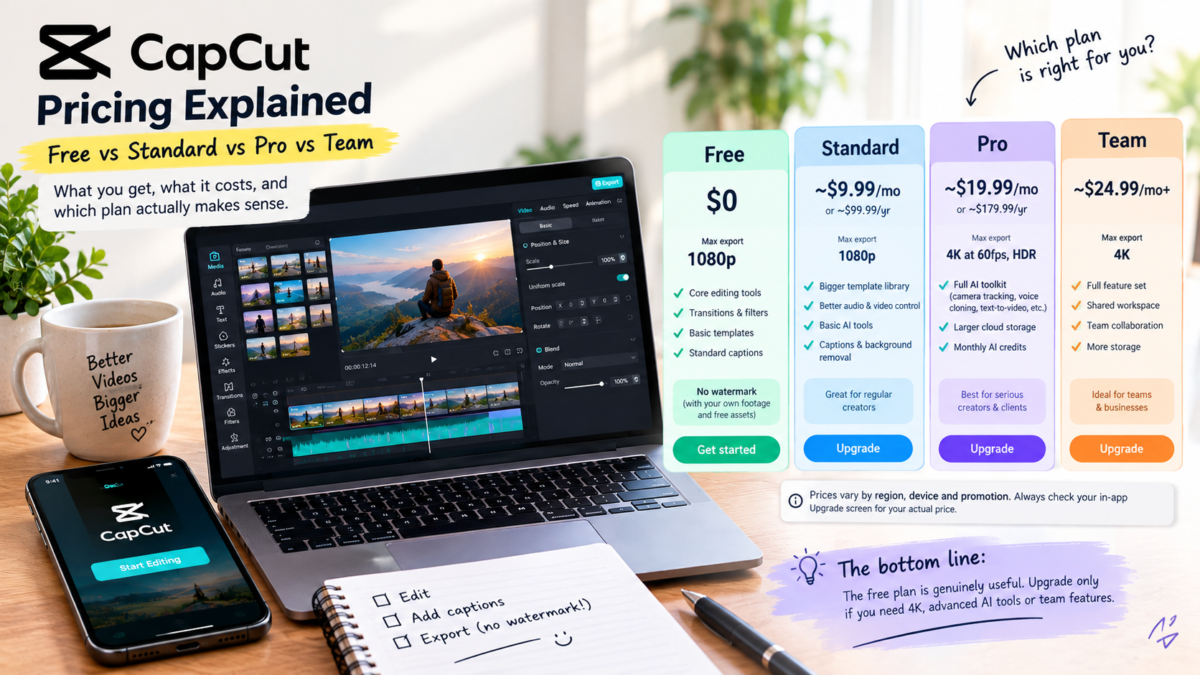
| Tier | Price | Max export | AI tools |
|---|---|---|---|
| Free | $0 | 1080p | Basic (limited credits) |
| Standard | ~$9.99/mo or ~$99.99/yr | 1080p | Essential (captions, basic background removal) |
| Pro | ~$19.99/mo or ~$179.99/yr | 4K at 60fps, HDR | Full suite (camera tracking, voice cloning, text-to-video) |
| Team | ~$24.99/mo+ | 4K | Full suite, shared workspace |
Why “Official” CapCut Pricing Numbers Don’t Always Match
If you’ve searched for CapCut’s official pricing and landed on different numbers from different sites, that’s not sloppy reporting — it’s genuinely how CapCut works. CapCut doesn’t publish one global price sheet. It sets pricing in-app based on your region, device, and any active promotion, and its own help pages don’t always agree with each other either.
The $9.99/month Standard and $19.99/month Pro figures used throughout this post are the most consistently reported US web checkout prices as of publishing. Someone in Brazil or Germany will often see a different number, due to regional pricing. The only figure that actually matters for your wallet is the one shown on your own account’s in-app “Upgrade” screen.
What Actually Changed in 2026
Before this year, CapCut had one simple decision: free, or Pro for around $8 a month. That’s gone. The old Pro plan got renamed Standard and kept roughly the same price, while a new Pro tier launched above it at $19.99/month and absorbed most of the features people actually upgraded for in the first place — the generative AI tools especially. If you subscribed to Pro a year ago for AI voice cloning or text-to-video, that same capability now sits behind a plan that costs closer to $20 a month, not $8.
CapCut Free — What You Actually Get
Don’t let the “free” label fool you into expecting a stripped-down demo. Free covers core timeline editing, transitions, filters, basic templates, and standard captions, and — this is the part people get wrong — a project made from your own footage and free assets exports with no watermark. The watermark only shows up if your project uses a Standard- or Pro-marked template or asset.
One recent change worth knowing: the free tier used to include 1GB of cloud storage. That’s been discontinued, so free-tier projects now stay local to your device rather than syncing automatically.
CapCut Standard — Who It’s Actually For
Standard sits in an awkward middle spot. You get a broader template and asset library, better audio and video control, and essential AI tools like basic captioning and background removal — but you’re still capped at 1080p, and the heavier AI tools stay locked. It makes sense if you post short-form content regularly and keep bumping into the free tier’s asset limits, but don’t buy it expecting the AI toolkit; that’s a Pro-only line.
CapCut Pro — What the Extra $10 a Month Buys You
Strip away the marketing and Pro gets you four concrete things over Standard: 4K export at 60fps with HDR, the full AI toolkit (camera tracking, vocal isolation, speaker-ID captions, AI voice effects, and generative tools like text-to-video and voice cloning), a much larger cloud storage allowance, and a monthly AI credit pool for the generative features.
The catch nobody puts in the headline: that AI credit pool runs out. CapCut sells additional credit packs starting at $4.99, and if you lean on the generative AI tools regularly, those add-on packs can push your real monthly cost well past the sticker price.
Another honest gap: CapCut’s own pages don’t agree with each other. Some current CapCut pages list Pro storage at 100GB, while other official comparison pages say up to 1TB. Rather than pick a number and hope it’s right, check the figure shown in your own account’s checkout screen — that’s the only version that’s actually accurate for you.
There’s also a Team plan for collaborative workflows, starting around $24.99/month according to CapCut’s own resource pages — worth knowing if you’re editing with a group, though most solo creators will never need it.
Should You Actually Upgrade?
Stay on Free if: you’re editing Reels or TikToks casually and don’t need 4K output — most creators genuinely don’t need to pay anything.
Standard makes sense if: you post consistently and want a bigger template library, but you’re not relying on AI generation tools.
Pro is worth it if: you deliver client work or post to platforms where 4K genuinely matters, or the generative AI tools save you real time every week — not just once.
Quick note: you’ll likely come across third-party sites offering discounted “CapCut Pro” through shared or resold subscriptions. These are subscription-sharing arrangements that typically violate CapCut’s terms of service and put your login and project data at risk — not worth the savings.
Whichever tier ends up making sense for you, the free version is the right place to start — it’s genuinely capable on its own. For the desktop version and how it compares to other free editors, see our Best Free Video Editing Apps 2026 roundup.
FAQ
Is CapCut free or paid?
Both — the free plan is permanent and genuinely usable, with paid Standard and Pro tiers on top for extra templates, higher export resolution, and AI tools.
Is CapCut pricing the same for everyone?
No. CapCut sets prices by region, device, and promotion rather than publishing one global price list. Always check your account’s in-app Upgrade screen for your actual price.
Does CapCut Free add a watermark to my videos?
No — not if your project uses only your own footage and free assets. Watermarks only appear when a project includes a Standard- or Pro-marked template or asset.
What’s the actual difference between CapCut Standard and Pro?
Standard gives you a broader template library and essential AI tools like captioning. Pro adds 4K export, the full generative AI toolkit, and significantly more cloud storage.
Why did my CapCut subscription get more expensive?
CapCut restructured in early 2026, moving generative AI features that used to sit in an ~$8/month Pro plan up into a new ~$20/month Pro tier, with the old plan renamed Standard.
Is CapCut Pro worth it for casual creators?
Usually not. If you’re not exporting in 4K or relying on generative AI tools weekly, the free tier covers most casual editing needs.
Affiliate & Referral Disclosure: Some links in this post are affiliate or referral links, which means we may earn a small commission if you sign up through them — at no extra cost to you. We only recommend tools we’ve researched and believe are legitimate. No hype. Just truth. Sip. Click. Earn.