A quick heads-up before anything else: if you’ve seen “Sora” recommended in other 2026 roundups of image-to-video tools, that’s outdated. OpenAI has discontinued the Sora web and app experience and is winding down the API — so it’s no longer a real option to test, no matter how many articles still list it. That’s the kind of thing that goes stale fast in this space, so treat any “best AI video tools” post (including this one, eventually) as something to double-check against the tool’s own site before you commit real time to it.
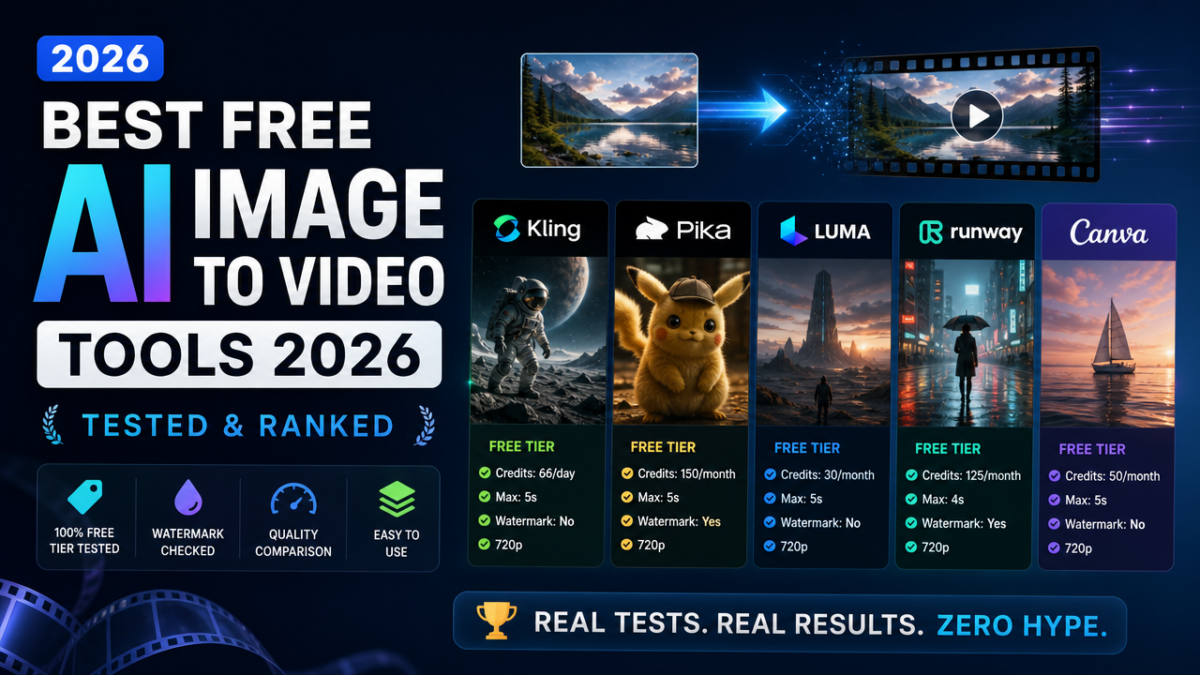
The short answer: For genuinely usable free image-to-video right now, test Kling AI first (daily refreshing credits, no watermark, 720p cap), then Pika (150 monthly credits, best free-tier value, but watermarked), then Luma (30 free generations/month at 720p). Runway gives you 125 credits — but only once, ever, not monthly — so treat it as a one-time trial, not a tool you can rely on for free. If you just want something simple with zero prompt-engineering, Canva and Adobe Firefly both offer free, no-fuss image-to-video with none of the credit-tracking headache.
What “Free” Actually Means Here
Every tool on this list calls itself free, but “free” breaks down into at least four different deals, and mixing them up is how people waste an afternoon:
- Recurring monthly credits (Pika, Luma): you get a fresh batch every month, genuinely reusable long-term.
- Recurring daily credits (Kling): smaller amounts but they refresh every day, which can add up to more monthly volume than a bigger one-time number.
- One-time lifetime credits (Runway): you get 125 credits total, once — after that, you’re paying. This is a trial, not a free tier, even though it’s marketed similarly to the others.
- Free-forever simple tools (Canva, Adobe Firefly, VEED): usually capped on resolution or length rather than credits, but don’t require you to track a balance at all.
Free Tool Comparison
| Tool | Free tier | Watermark | Resolution cap | Best for |
|---|---|---|---|---|
| Kling AI | Daily refreshing credits | No (standard exports) | 720p | Realistic motion, facial expression |
| Pika | 150 credits/month | Yes | Standard | Fast social/creative experiments |
| Luma (Ray) | 30 generations/month | Varies | 720p | Cinematic camera moves, product shots |
| Runway | 125 credits, one-time only | No | Varies by plan | Testing production-grade quality before paying |
| Canva / Adobe Firefly | Free, capped output | No | Up to 4K (Firefly) | Beginners, no prompt-engineering needed |
Kling AI — best realistic motion for free
Kling stood out in independent testing for how naturally it handles subtle motion — fabric movement, small facial expressions — often ahead of Runway in head-to-head tests on the same image. The daily credit refresh (rather than a monthly pool) means consistent users can actually generate more over a month than the bigger-sounding one-time numbers other tools advertise. The catch: it originated in China and regional availability can be inconsistent, so don’t build a client workflow around it without testing your specific region first.
Choose Kling if: you want the most realistic-looking motion without paying, and you’re generating a little each day rather than in one big batch. Skip it if: you need guaranteed, consistent access for a time-sensitive project — the regional availability issue is a real risk there.
Pika — best free-tier value for quick content
150 refreshing monthly credits is the most generous ongoing free allowance on this list, which makes Pika a genuinely repeatable tool rather than a one-time trial. The output carries a watermark on the free tier, so it’s better suited to testing ideas and social content than anything client-facing.
Choose Pika if: you’re generating short social clips regularly and a watermark isn’t a dealbreaker. Skip it if: you need clean, watermark-free exports for client or commercial use — you’ll need a paid plan here or a different tool entirely.
Luma — best for cinematic camera movement
Luma’s Ray model (the successor to the older “Dream Machine” branding you’ll still see referenced in older articles) is particularly strong at directed camera movement — slow pushes, pans, parallax — described in plain language rather than technical camera terms. 30 free generations a month at 720p is a solid amount for testing product shots or short cinematic concepts before committing to a paid plan for higher resolution.
Choose Luma if: camera movement and cinematic feel matter more than raw realism. Skip it if: you need longer clips or higher resolution than 720p — that requires upgrading.
Runway — treat the free tier as a trial, not a tool
Runway’s Gen-4.5 model is genuinely one of the strongest for directed camera control and production-grade editing, but the free tier is 125 credits, once — not a monthly allowance. That makes it a good way to test whether Runway’s quality is worth paying for, but not something you can rely on as an ongoing free tool the way you can with Kling or Pika.
Choose Runway if: you’re seriously evaluating it as a paid tool and want to test quality first. Skip it if: you’re looking for a tool you can keep using for free long-term — budget for a subscription instead, or use it sparingly.
Canva & Adobe Firefly — best for zero learning curve
If prompt-writing and credit-tracking sound like more hassle than you want, Canva’s Magic Studio and Adobe Firefly both offer straightforward image-to-video with simple controls (zoom, pan, tilt) instead of open-ended prompts. Firefly in particular is trained only on licensed and public domain content, which makes its output commercially safer to use than tools with murkier training data — worth knowing if this is for a business rather than a personal project.
Choose these if: you want something usable in five minutes with no learning curve, or you need commercially safe output for business use. Skip them if: you want the most creative or cinematic control — that’s still Kling, Luma, or Runway’s territory.
Three Mistakes People Make Testing Free Image-to-Video Tools
1. Judging a tool by one demo clip. A tool that nails a polished demo image can still fail badly on your actual photo, face, or style. Test each tool with the same image and the same prompt before deciding — comparing different tests on different images tells you nothing real.
2. Forgetting to check commercial usage rights before client work. A free output being possible doesn’t mean it’s cleared for paid ads or client deliverables — license terms vary by tool and by plan. Check this before you deliver anything to a client, not after.
3. Confusing a one-time trial with a real free tier. Runway’s 125 credits feel generous until you realize they don’t come back. Plenty of people build a workflow around a “free tool” that quietly stops being free after the first project.
FAQ
What happened to Sora?
OpenAI discontinued the Sora web and app experience and is winding down the API. If you see it recommended in a 2026 roundup, that article hasn’t been updated recently.
Which free tool has the best video quality?
For realistic motion, Kling AI tests ahead of most free competitors. For cinematic camera work, Luma’s Ray model is the standout. Runway is arguably the strongest overall, but its free tier is a one-time trial rather than something to rely on long-term.
Can I use free AI-generated videos commercially?
It depends on the tool and plan — don’t assume a free output is cleared for client work or paid ads. Adobe Firefly is explicitly built for commercial safety; check the terms directly for any other tool before using output professionally.
Is there a completely free tool with no watermark and no credit limits?
Not really, as of 2026 — every tool trades off one of watermark, credit limits, or resolution cap. Kling comes closest (no watermark, daily refreshing credits) but caps resolution at 720p on the free tier.
The Bottom Line
There’s no single best free image-to-video tool in 2026 — there’s a best one for what you’re actually making. Test Kling first if realistic motion matters most, Pika if you want the most generous ongoing free allowance for social content, and Luma if cinematic camera movement is the goal. Treat Runway’s free tier as a one-time quality test rather than an ongoing free tool, and reach for Canva or Adobe Firefly if you just want something simple that works in five minutes. Whatever you pick, test it against your own image before trusting any tool’s demo reel.
Disclosure: This post reflects independent research and testing summaries as of 2026. It may contain affiliate links for tools mentioned; if you sign up through one, we may earn a commission at no extra cost to you. Pricing and free-tier details change often — always confirm current terms on each tool’s own site before relying on them for a project.