Let me be upfront with you: I don’t run a big YouTube channel. What I do run is a content production stack — AI voiceovers, text-to-video tools, automation — for my own blogs and brands, and I write about these tools for a living. So when OutlierKit kept showing up in creator circles, I did what I always do before recommending anything: signed up for the free trial, ran it on a real niche, checked the pricing page against the marketing page, and wrote this OutlierKit review the same way I’d evaluate a tool for my own stack.
Disclosure: This post contains affiliate links. If you sign up through them, I earn a commission at no extra cost to you — and it changes nothing about what I write here. The downsides section below is the proof. Full details in my affiliate disclosure.
Short version: I liked it more than I expected to. But there’s a pricing catch the homepage doesn’t advertise, and I’ll show you exactly where it is — because that catch decides whether this tool costs you $29 or $49 a month. Coffee ready? Let’s get into it.
⚡ Quick answer: This OutlierKit review comes down to one question — do you pick your next video by data or by gut? OutlierKit finds “outlier” videos (ones massively beating their channel’s average) across an entire niche from a single seed channel, which vidIQ and TubeBuddy genuinely don’t do. Best for faceless and automation channels. The catch: the headline niche-mapping feature needs the $49 Pro plan, not the advertised $29 one. Free trial is 10 credits, no card. My rating: 4/5.
Why This Tool Caught My Attention
Most YouTube advice is astrology with charts. “Post consistently.” “Better thumbnails.” “Find your voice.” Meanwhile, the one decision that actually grows or kills a channel — which video do I make next? — gets made on vibes.
The numbers behind that decision are brutal. There are over 50 million active YouTube creators competing for attention, and the difference between a channel that grows and one that stalls is almost never production quality — it’s topic selection. Faceless and automation channels feel this hardest, because they live or die on picking breakout topics before they saturate. That’s the exact problem this tool sells the answer to, which is why it earned a spot in my review queue.
First, What’s an “Outlier”? (The Smartest Metric on YouTube)
Raw view counts lie to you. A video with 500,000 views on a 5-million-subscriber channel is nothing — the channel’s size did that, not the video. But 100,000 views on a channel that normally gets 10,000? That’s a 10x outlier, and it’s the most honest signal on the platform: the algorithm pushed that video far beyond what the channel “deserved,” which means something worked. The topic, the title, the hook — or all three.
Here’s why outliers matter for you specifically: they’re transferable. A big channel’s success mostly isn’t — it’s built on subscribers and history you don’t have. An outlier won on merit against its own baseline, so the topic and format can work for a small channel too. Smart faceless channels choose every upload this way: find what’s breaking out across the niche, make your version before it saturates.
You can hunt outliers manually — scroll competitor channels, eyeball which videos beat their averages. I’ve done it. It takes hours per channel, and you’ll miss the channels you don’t know exist. That manual grind is the entire product here.
OutlierKit Review: What the Tool Actually Does
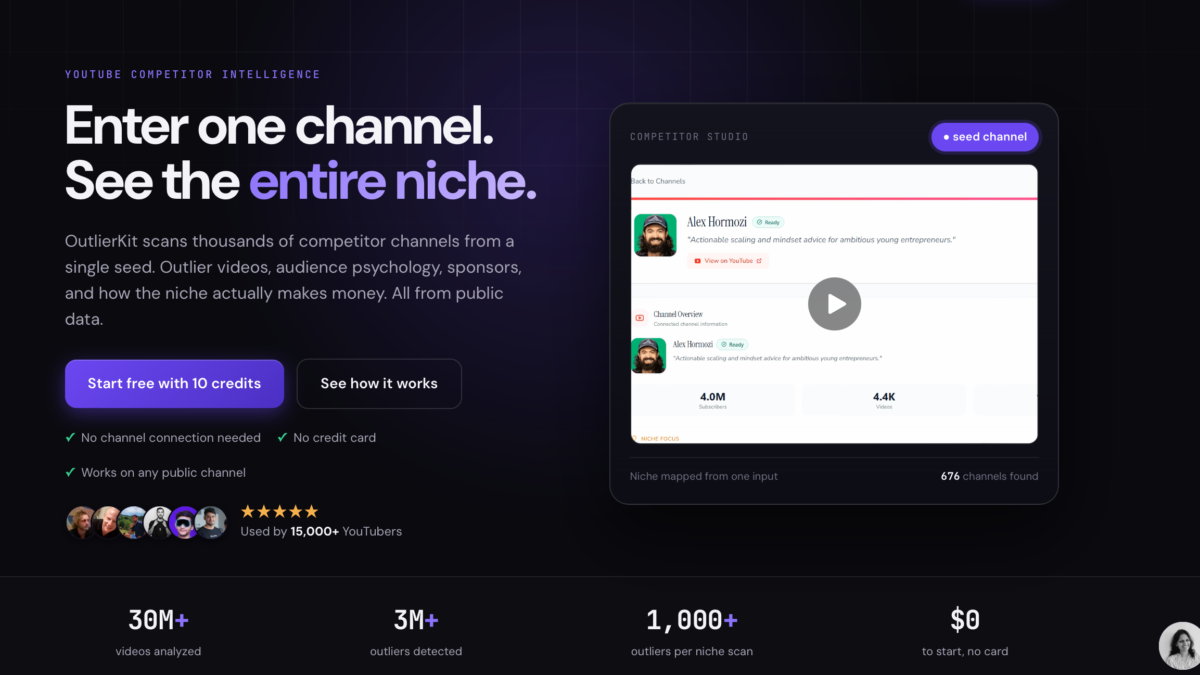
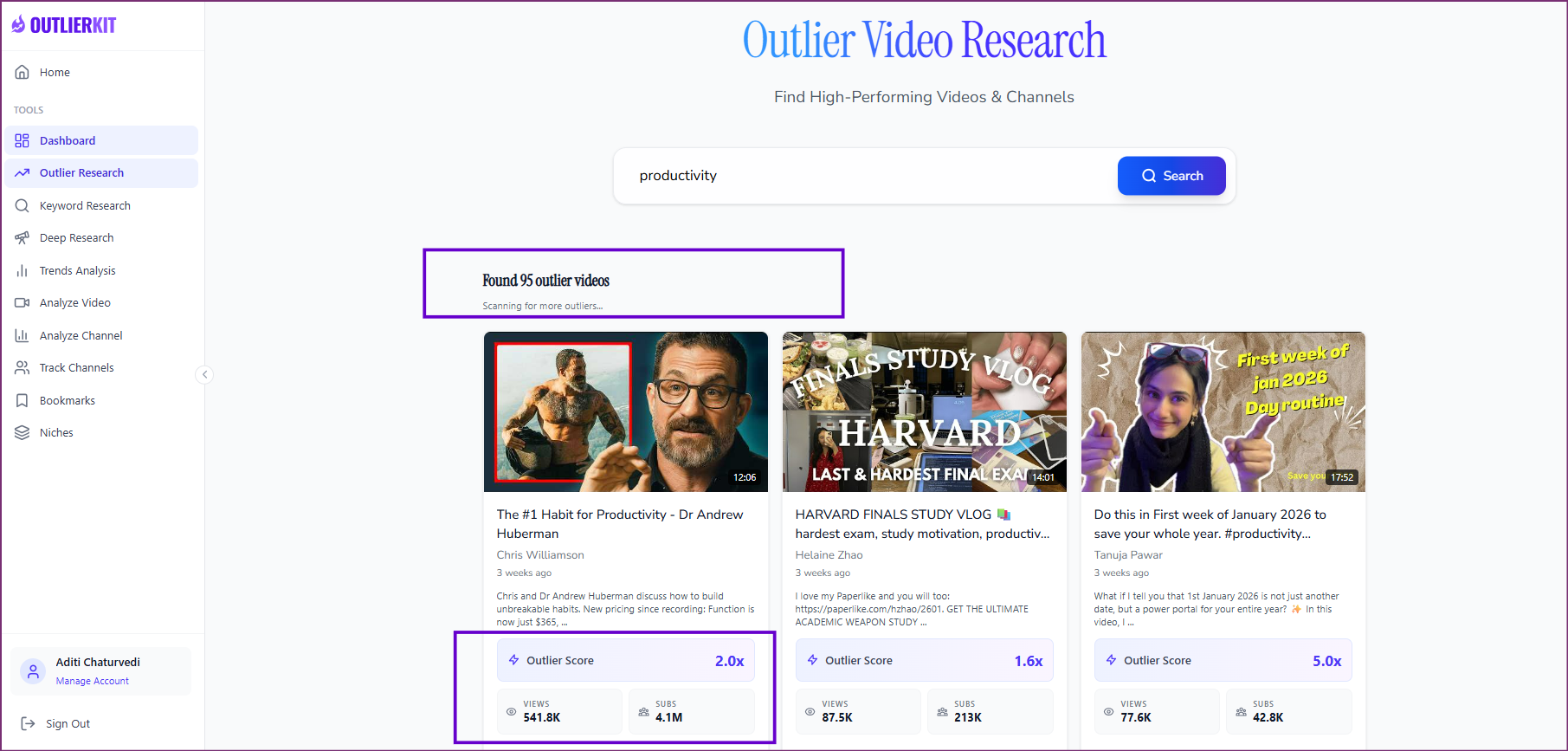
You drop in one channel — yours, a competitor’s, or any public channel in a niche you’re curious about. No account connection, no permissions, works on any public channel. From that single seed, it scans the surrounding niche and surfaces every outlier it finds, each scored with its multiplier, real view count, and recency. Sort by multiplier and recency and you’re looking at a ranked list of what’s breaking out in your niche right now.
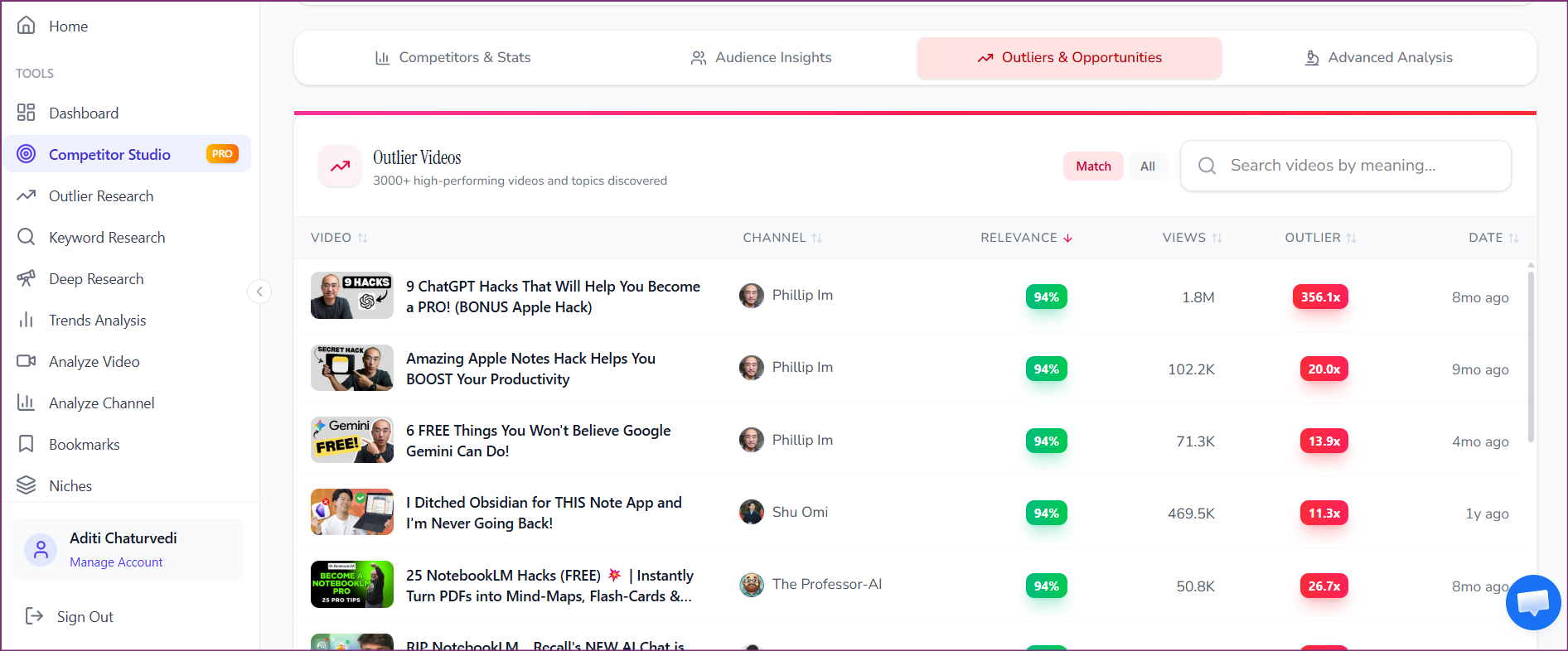
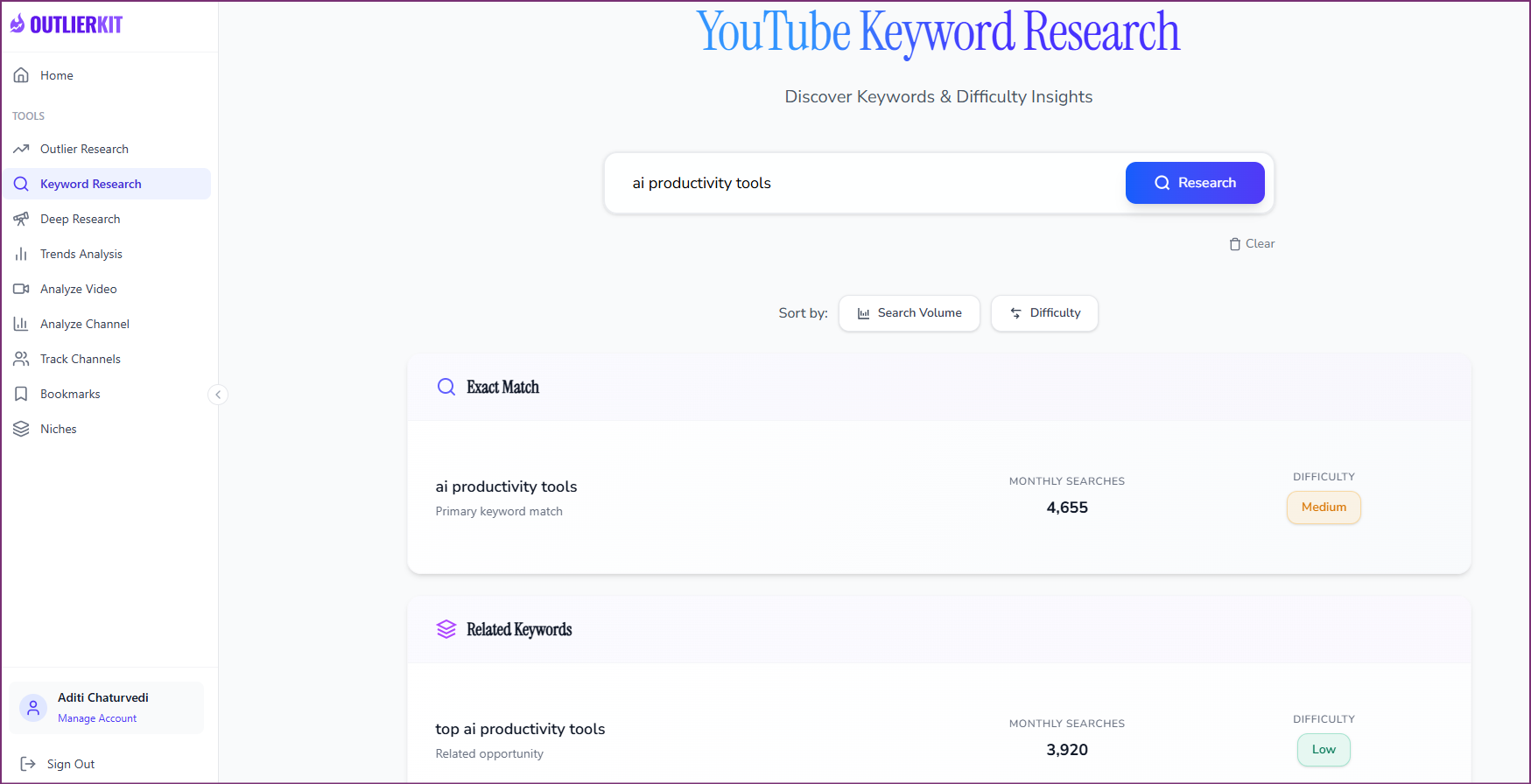
Four core tools come with every plan, and each costs credits:
- Outlier research (1 credit) — the main event. Overperforming videos on any channel or across a niche, sortable by multiplier, views, and recency.
- Keyword research (1 credit) — low-competition YouTube keywords with search volume and difficulty. Topics you can rank for, not ones MrBeast already owns.
- Script & hook analysis (5 credits) — scores any video on hook strength, curiosity loops, pacing, and payoff. Useful for reverse-engineering why an outlier worked.
- Channel analysis (5 credits) — a deep read on one channel: audience, formats, ideal video length, and the patterns behind its best videos.
The higher tiers add Competitor Studio — the full niche map from one seed channel — plus audience psychographics and the genuinely unusual part: sponsor and monetization intelligence. Which brands pay channels in the niche, and how the niche actually makes money. I haven’t seen any other tool in this category map that, and for anyone treating YouTube as a business, knowing which sponsors pay in a niche before entering it is due diligence that used to require insider contacts.
One naming clarification before we go further, because I get asked this: OutlierKit has nothing to do with Outlier AI, the platform that pays people to train AI models. Same word, completely different companies — I covered the gig platform separately in my Outlier AI assessment guide. This review is about the YouTube research tool.
The Free Trial, Honestly: What 10 Credits Really Buy
Here’s the math nobody puts in the headline. The trial gives you 10 credits, no card required. Quick searches cost 1 credit; deep analyses cost 5. So your 10 free credits are really ten quick searches, or two deep analyses, or a mix — one channel analysis plus five outlier searches is a sensible test drive.
That’s genuinely enough to evaluate the tool on your own niche, which is more than most SaaS trials give you. But plan your credits before you start clicking, or you’ll burn half of them figuring out what costs what — I did exactly that on my first session. And note what’s not in the trial: Competitor Studio, the full niche map from the marketing. More on that in the downsides, because it’s the part that changes the price.
What Genuinely Impressed Me
The niche-wide view is the real product. vidIQ and TubeBuddy answer “how is this channel doing?” OutlierKit answers “what’s working across this entire space?” — which is the question that actually decides your next upload. Doing this manually across even twenty channels is an afternoon. Here it’s one search.
The multiplier scoring keeps you honest. Because everything is ranked relative to each channel’s own baseline, you stop being seduced by big absolute numbers from big channels — the exact trap that makes people copy MrBeast formats with 200 subscribers.
Sponsor and monetization mapping is a first. This blog’s whole audience treats content as a business. Seeing which sponsors are active in a niche, and how channels there actually earn, turns “should I enter this niche” from a guess into a spreadsheet decision.
No channel connection needed. You research any niche without linking your account or touching anything beyond public data. Zero-friction, zero-risk trial — the way trials should work.
The Honest Downsides (Read Before Paying)
My “no hype, just truth” rule means this section earns its length. None of these killed the tool for me — but one of them nearly moved my rating down, and depending on your budget, it might move your decision.
The honest downside #1 — the best feature lives behind the $49 tier. The homepage leads with “enter one channel, see the entire niche.” But Competitor Studio, the tool that actually does that, requires the Pro plan. The $29 Hobby plan gets you the four core tools — useful, but if the niche map is what sold you (it’s what sold me), the real price is $49/month. That gap between the headline pitch and the entry price is my biggest complaint, and it’s why the Quick Answer above mentions it.
The honest downside #2 — credits make you ration your curiosity. 100 credits a month on Hobby sounds generous until you remember deep analyses cost 5 each. Research-heavy weeks make you think about what each click costs — a small psychological tax that flat-price tools don’t charge.
The honest downside #3 — it’s a young tool from a three-person team. That cuts both ways: small teams ship fast and the product feels current, but you’re not buying decade-old infrastructure like TubeBuddy. Expect features, limits, and pricing to move under you. Don’t build a business process around any single young SaaS — this one included.
The honest downside #4 — their own comparison content is self-serving. The site’s comparison table ranks OutlierKit favorably against vidIQ, TubeBuddy, and 1of10 — written by, of course, OutlierKit. Their blog even publishes “best affiliate programs” lists ranking their own program #1. None of that makes the product bad, but treat vendor-published claims the way you’d treat any vendor’s: verify in the trial. The free credits exist for exactly this.
The honest downside #5 — it tells you what’s working, not how to make it. An outlier list is a topic list, not a video. If your production pipeline is the bottleneck — and for most solo creators it is — this tool sharpens your aim without adding ammunition. Know which problem you’re actually paying to solve.
OutlierKit Pricing: The Real Numbers
Verified against the official pricing page in July 2026. Annual billing cuts these hard — Hobby drops to about $16.60/month equivalent.
| Plan | Monthly | Credits | What you’re really buying |
|---|---|---|---|
| Hobby | $29 | 100/mo | The four core tools. No niche map. |
| Pro | $49 | 500/mo | Competitor Studio (the actual headline feature), audience psychographics, sponsor data, API access. |
| Max | $199 | 2,000/mo | Agency scale — 50+ connected channels, on-demand refresh. Skip unless you run client channels. |
Every plan starts with 10 free credits, no card. Pricing verified July 2026 — always check the current page before subscribing.
My honest plan advice: start with the free trial, and if you buy, decide on one question — do you need the niche map, or just the research tools? A serious-but-part-time creator can live on Hobby. Anyone running a faceless channel as a business should price in Pro, because the niche-wide scan is where “what should I make next” actually gets answered.
OutlierKit vs vidIQ vs TubeBuddy: The Honest Comparison
These solve different problems, and pretending otherwise is how affiliate blogs lose your trust.
vidIQ ($7.50/mo, free plan available) and TubeBuddy ($3/mo, free plan) are channel optimization tools — SEO, tags, thumbnails, managing what you’ve already built. Both have added their own outlier-style features, and vidIQ’s is genuinely solid, with filters. 1of10 ($29/mo) is the closest direct rival on outlier detection, but it works from keyword searches rather than mapping a whole niche from one seed. OutlierKit is weaker as a daily channel manager and much stronger at answering what to make next, niche-wide — and it’s alone on the sponsor and monetization layer.
The budget-honest recommendation, because $29/month is real money: if it’s a stretch for your channel right now, start on vidIQ’s free plan and hunt outliers manually — the concept works at any budget, just slower. Graduate to OutlierKit when the hours you spend on manual research cost more than the subscription. That’s not a knock on the tool. It’s just the order of operations that respects your money.
Where OutlierKit Fits in a Faceless YouTube Stack
If you’re building a faceless or automation channel, this tool takes the first position in a three-step pipeline this blog now covers end to end:
- Step 1 — Research: OutlierKit tells you which topics are breaking out in your niche before they saturate.
- Step 2 — Voice: an AI voiceover carries a faceless video, and the gap between good and robotic is the whole game — that’s a separate post on this blog.
- Step 3 — Production: turn the script into a finished video with stock footage and captions. That’s what I tested in my Pictory review, including the ElevenLabs voice minutes bundled into its plans.
Research, voice, video — the whole stack runs without a camera. One rule though: never marry a stack, especially one built from young SaaS products. Every piece above is independently replaceable, and that’s a feature.
⚠️ 3 mistakes creators make with outlier research
1. Copying the video instead of the reason. An outlier tells you a topic-title-hook combination worked. Cloning it word for word puts you in a saturation race. Extract the pattern, apply it to your angle.
2. Ignoring recency. A 15x outlier from 2023 is a history lesson, not an opportunity. Sort by recency first — the money is in what’s breaking out now, before it saturates.
3. Researching instead of publishing. Tools like this can become procrastination with a dashboard. One search, one shortlist, one video in production. Then search again.
FAQ: OutlierKit Review
What is an outlier video on YouTube?
A video that dramatically beats its own channel’s average views — a 10x outlier earned ten times the channel’s normal performance. Outliers signal that a topic, title, or format worked on merit rather than channel size, which makes them the most transferable ideas for smaller channels to learn from.
Is OutlierKit free?
There’s a free trial with 10 credits and no card required — enough for about ten quick searches or two deep analyses. Paid plans start at $29/month ($16.60/month billed annually), and the full niche-mapping Competitor Studio requires the $49 Pro plan.
Is OutlierKit better than vidIQ?
Different jobs. vidIQ is stronger and far cheaper for day-to-day channel optimization and SEO. OutlierKit is stronger for niche-wide topic research, and it’s alone in mapping sponsors and monetization across a niche. Casual creators should start on vidIQ’s free plan; serious faceless-channel operators are the ones who get their money’s worth here.
Does OutlierKit need access to my YouTube channel?
No. It works entirely from public data — you seed it with any public channel, yours or anyone else’s, without connecting an account.
Is OutlierKit the same as Outlier AI?
No — same word, different companies. OutlierKit is a YouTube research tool; Outlier AI is a platform that pays freelancers to train AI models. If you were looking for the second one, my Outlier AI assessment guide covers it.
Final Verdict: Is OutlierKit Worth It?
If I were starting a faceless channel tomorrow, here’s exactly what I’d do: run the free trial on my target niche today, spend the 10 credits on one channel analysis and five outlier searches, and let the results answer the only question that matters — is the list this tool hands me better than my instincts? Mine was. If the answer is yes and the channel is a real business, I’d pay for Pro and treat the $49 as topic-selection insurance. If the channel is still a weekend project, I’d stay on vidIQ free and come back when my research hours cost more than the subscription.
OutlierKit does one important thing better than the established tools: it turns “what should I make next?” from a feeling into a ranked list. The outlier concept is the smartest lens on YouTube performance, the execution is real, and the sponsor intelligence is a genuine first. Against that: the headline feature costs $49 rather than the advertised $29, credits nudge you to ration, and it’s a young product from a tiny team. 4/5 — the missing point is the Hobby/Pro pricing gap and the platform’s youth, not the core idea, which is excellent.
Test OutlierKit on your niche free — 10 credits, no card →
Running a channel and tried outlier research already? Drop a comment below with your niche — I read every one. Sip. Click. Earn. ☕