Here’s a number worth knowing if your customers already message you on WhatsApp: most support platforms weren’t built for that conversation at all. They were built for a website chat widget, and WhatsApp got bolted on as an afterthought. Wati took the opposite approach — it started as a WhatsApp team inbox in 2020 and grew from there. That’s the whole reason it exists, and it’s the reason this Wati review focuses so heavily on Wati pricing: WhatsApp Business API tools all charge in layers, and Wati is no exception.
The short answer: Wati is a genuinely capable WhatsApp Business API platform — shared inbox, no-code chatbot builder, AI-powered lead qualification and support, solid Shopify/WooCommerce integrations. The Growth plan starts around $59/month, Pro (their most popular tier) around $119–149/month, plus a free 7-day trial with no card required. The catch: that’s only the subscription fee. Real bills run 30–50% higher once WhatsApp message markups and add-ons stack on top. If your customers live on WhatsApp rather than your website, it’s worth the trial. If they don’t, you’re solving the wrong problem — more on that below.
This post contains an affiliate link — see full disclosure at the end.
What “Wati Pricing” Actually Means in 2026
Before comparing numbers, it helps to know that Wati’s real cost has three separate layers, and the Wati pricing page on their site only shows you one of them:
- The subscription fee ($59–149+/month): This is the number everyone quotes, and it’s accurate as far as it goes.
- WhatsApp message charges (variable, per message): Wati adds its own markup on top of Meta’s base rate for template messages. The markup varies by message category and country — small on some marketing messages, considerably higher on utility and authentication templates.
- Add-ons (variable): Extra users beyond your plan’s included seats, extra WhatsApp numbers, additional automation triggers once you exceed your monthly cap, and a separate Shopify integration fee.
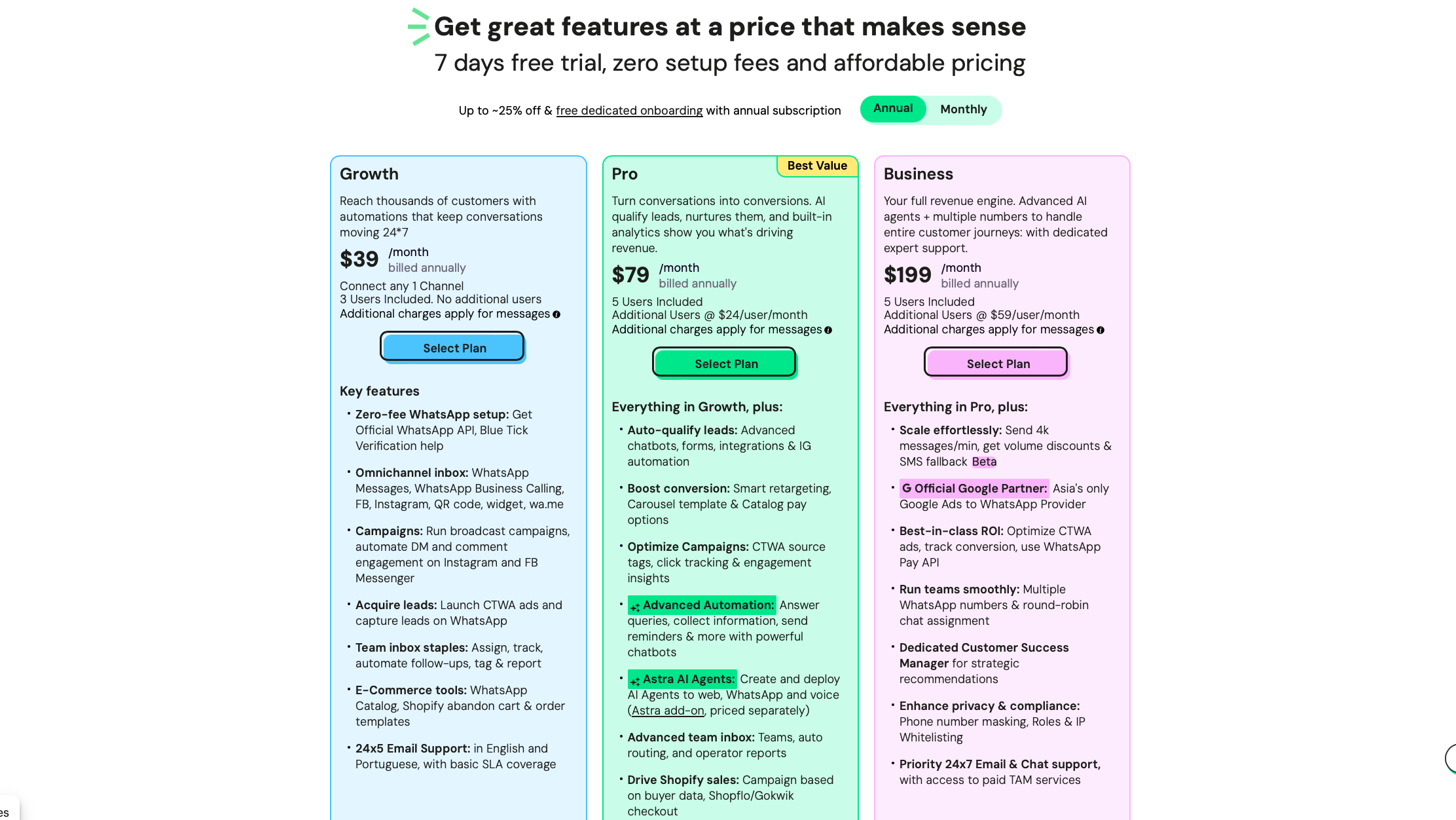
Independent pricing breakdowns that dig into real invoices put the realistic total 30–50% above the advertised plan price once all three layers are counted. That’s not a scam — it’s just not what the pricing page leads with. Budget for it accordingly.
Wati Pricing Plans, Compared
| Plan | Best for | Starting cost |
|---|---|---|
| Growth | Small teams just automating WhatsApp basics | ~$59/month, 3 users included |
| Pro | Most businesses (Wati’s “Best Value” tier) | ~$119–149/month, 5 users included |
| Business | Multi-number, high-volume operations | Custom, volume-based |
All plans exclude WhatsApp message costs and most add-ons — see the cost layers above. Prices change often; always confirm on Wati’s current pricing page before committing.
Growth — the entry point
Growth gets you the core toolkit: shared team inbox, broadcast campaigns, catalog, and basic AI co-pilot credits. The hard limit here is 3 users with no option to simply add a seat — you’re pushed to Pro the moment a fourth person needs access, which several reviewers flag as a deliberate upsell rather than a natural growth point.
Choose Growth if: you’re a small team testing whether WhatsApp automation is worth investing in. Skip it if: you already know you’ll need more than 3 people in the inbox — you’ll be upgrading within weeks anyway.
Pro — where most businesses land
Pro adds the advanced no-code chatbot builder, lead auto-qualification, smart retargeting, and the option to bolt on Wati’s standalone AI agent product (Astra), priced separately. This is the tier Wati itself pushes hardest, and for most small-to-mid businesses, it’s the realistic starting point rather than Growth.
Choose Pro if: you want AI-qualified leads handed to a human rep, or you’re running WhatsApp ad campaigns you need to optimize. Skip it if: your needs are still simple — Growth (or honestly, a trial) will tell you that before you commit to the higher tier.
Business — multi-number, high-volume teams
Business unlocks multiple WhatsApp numbers, round-robin assignment across a bigger team, a dedicated Customer Success Manager, and volume discounts on messaging. It’s genuinely built for scale, not for a small shop dabbling in automation.
Choose Business if: you’re running WhatsApp across multiple locations or brands. Skip it if: you’re not already outgrowing Pro — this tier’s cost only makes sense at real volume.
What Real Users Say (G2, Capterra, Trustpilot)
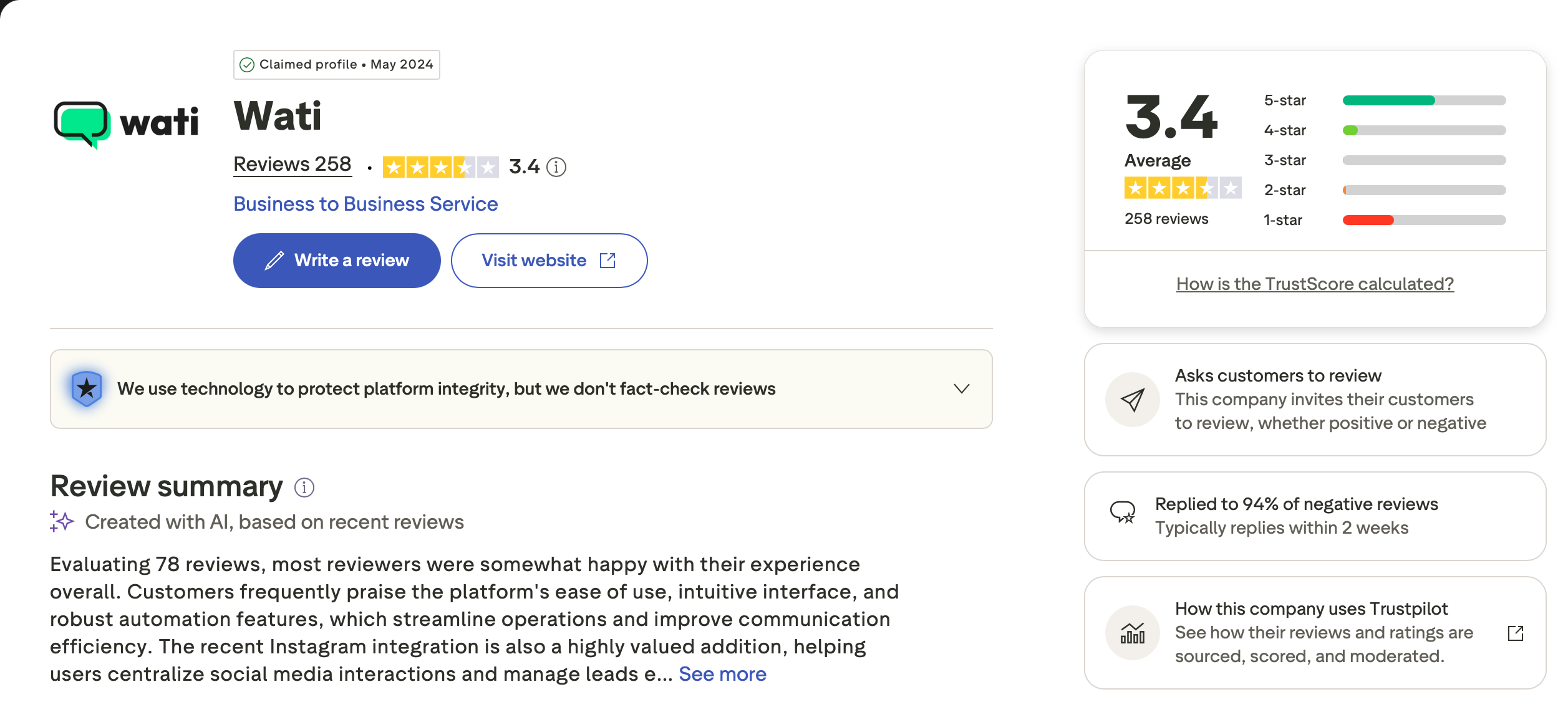
Ratings sit around 4.6/5 on both G2 and Capterra, but noticeably lower — 3.4 to 3.9/5 — on Trustpilot. That gap tells its own story.
What people like: a genuinely easy interface with fast onboarding, reliable integrations (Google Sheets, Zapier, WooCommerce), and solid day-to-day support for straightforward questions.
What people complain about: Wati pricing complexity is by far the most repeated issue — “every tiny bit is priced and chargeable” is close to a direct quote across multiple reviews. Support responsiveness drops off for teams that have scaled up, with some reporting 1–3 business day waits on non-priority tickets. There’s also a recurring Trustpilot complaint cluster around cancellation friction and continued charges after a cancellation request — if you sign up, use a card you can dispute charges on and get any cancellation confirmed in writing.
Wati vs. the Alternatives
Wati isn’t trying to be a general website chat widget — that’s a different job, and one we’ve covered separately if your business runs mainly through your website rather than WhatsApp (Tidio and ManyChat are the better starting points there). Within the WhatsApp-specific space, Wati’s real competitors are AiSensy, Interakt, and Gallabox.
The honest pattern across comparisons: core features (shared inbox, no-code chatbot builder, catalog) are broadly similar across all of them. Gallabox, for instance, has a comparably opaque message-markup structure, so switching platforms doesn’t automatically fix the “hidden costs” complaint — it’s an industry pattern more than a Wati-specific flaw. The real differentiator ends up being support quality and how transparent each vendor is about layer two and three of the pricing, not raw feature count.
Three Mistakes Businesses Make When Budgeting for Wati
1. Budgeting only the subscription fee. If your quote is “$119/month,” your real bill is closer to $150–180/month once messages and add-ons are counted. Pad your estimate before you present it to a client or your own finance sheet.
2. Ignoring the automation trigger cap. Once you exceed your plan’s monthly automation triggers, chatbots simply stop firing — no warning banner, they just go quiet until you buy a top-up or the month resets. Check your expected volume against the plan’s cap before you commit.
3. Signing up without a cancellation paper trail. Given the repeated Trustpilot complaints about continued charges after cancellation, treat this like any subscription with a documented history of billing disputes: cancel in writing, keep the confirmation, and use a card you can dispute charges on if needed.
Who Should Actually Use Wati
- Your customers already message you on WhatsApp: Wati earns its keep specifically here — common for businesses across South Asia, the Middle East, and Latin America, and increasingly for hospitality, education, and D2C brands globally.
- You run click-to-WhatsApp ad campaigns: the lead qualification and ad-to-chat tracking are built for exactly this.
- You sell on Shopify or WooCommerce: order updates and cart recovery land where customers actually look, though factor in the separate Shopify add-on fee. If you’re still finalizing your dropshipping supplier setup, get that settled first — see our dropshipping supplier comparison for 2026.
- Skip it if: your support volume is high enough that per-message markups will bite into margin, or predictable flat billing matters more to you than the lowest possible sticker price.
FAQ
Is Wati free to use?
No permanent free plan — but there’s a 7-day free trial with full feature access and no credit card required.
Can I use my existing WhatsApp number with Wati?
Yes, but you’ll need to delete the personal WhatsApp account linked to that number first, since the WhatsApp Business API requires a number with no existing consumer account attached.
Is Wati’s pricing really higher than advertised?
The subscription number itself is accurate. What’s missing from the pricing page is the per-message markup and add-on costs, which several independent breakdowns put at 30–50% above the sticker price in practice.
Is Wati good for a small ecommerce store?
Generally yes if you’re on Shopify or WooCommerce and want order updates and support inside WhatsApp rather than email — just budget for the Shopify add-on fee and message costs separately.
The Bottom Line
Wati does one thing well: it turns WhatsApp from a place customers message you into an actual customer engagement channel, with AI doing the first pass on both leads and support questions. The 7-day free trial makes it low-risk to test against your real conversation volume. Just go in with clear eyes on the three-layer pricing, read the rate card before an annual commitment, and keep a paper trail if you ever cancel. For businesses where WhatsApp is genuinely the primary channel, it earns a spot on the shortlist — just don’t expect the number on the pricing page to be the number on your invoice.
Affiliate disclosure: This post contains an affiliate link. If you sign up through it, we may earn a commission at no extra cost to you. We only recommend tools we’ve genuinely researched. Tool details and pricing reflect 2026 information — prices change often, so always check the current pricing page before committing.